HTTP Injector Evozi Features, Security & Performance
| Developer | Evozi |
| Updated | Just Now |
| Size | 66.21Mb |
| Version | v6.5.0 |
| Requirements | Android6+ |
| Downloads | 12738+ |
Description

HTTP Injector by Evozi is an Android networking application that allows users to create secure tunnels using SSH, VPN, DNS, and proxy technologies. Instead of sending internet traffic directly through an ISP, the app routes connections through custom servers, thereby giving users greater control over how their network requests are handled.
Moreover, unlike many networking applications that only provide a basic VPN connection, HTTP Injector includes advanced configuration tools for experienced users. At the same time, beginners can easily import ready-made configuration files without manually setting every option.
What Is HTTP Injector Evozi?
HTTP Injector is a customizable Android tunneling application developed by Evozi. It supports multiple secure connection methods that help users encrypt traffic, connect through SSH servers, configure HTTP payloads, and use different proxy technologies within a single application.
As a result, many Android users prefer it when they require greater network customization instead of relying solely on standard VPN applications.
However, available features may differ depending on the Android version, imported configuration file, and selected server.
What HTTP Injector Evozi Offers You
Secure SSH Tunnel Support
First, the application can establish encrypted SSH tunnels between your Android device and a remote server. Consequently, transmitted data remains protected while reducing the possibility of interception on unsecured public networks.
Built-In VPN Service
Additionally, HTTP Injector includes Android VPN Service support, allowing most applications on the device to route traffic through the configured tunnel without requiring root access. Therefore, users can secure their connections on supported Android devices more conveniently.
HTTP Payload Generator
Instead of creating payloads manually, users can generate them through the built-in Payload Generator. As a result, the setup process becomes simpler while reducing formatting mistakes.
Custom HTTP Headers
Furthermore, advanced users can create customized HTTP requests by editing request headers according to their networking requirements. This flexibility allows more precise control over individual connections.
Proxy Configuration
In addition, the application supports several proxy options, including:
- HTTP Proxy
- Remote Proxy
- Local Proxy
- Upstream Proxy
- Squid Proxy (supported environments)
Because of these options, users can choose a configuration that best matches their server compatibility and networking needs.
DNS Configuration
Likewise, users can specify custom DNS servers instead of relying on their ISP’s default DNS service. However, available DNS options depend on the selected connection method and application version.
Configuration File Import
Another useful feature is support for importing configuration files. Consequently, users can complete the setup process much faster without manually entering every configuration.
Traffic Log and Debug Console
Moreover, the built-in log viewer displays connection status, handshake details, and error messages in real time. Therefore, troubleshooting network issues becomes considerably easier.
IPv4 and IPv6 Compatibility
Furthermore, depending on the server configuration and Android device, the application can operate with both IPv4 and IPv6 networks. As a result, it remains compatible with a wide variety of internet environments.
Multiple Tunnel Protocol Support
Finally, HTTP Injector may support multiple connection technologies depending on the installed version, including:
- SSH Tunnel
- SSL/TLS Tunnel
- HTTP Proxy
- SOCKS Proxy
- VPN Service
- DNS Tunneling (configuration dependent)
Overall, these networking options make HTTP Injector one of the more versatile Android tunneling applications for users who require advanced connection customization.
Networking Components Explained
Understanding several networking terms makes configuring HTTP Injector much easier.
| Component | Purpose |
|---|---|
| Payload | Custom HTTP request sent during connection setup |
| Remote Proxy | External proxy server that forwards traffic |
| SSH Host | IP address or domain of the SSH server |
| SSH Port | Network port used by the SSH service (commonly 22) |
| Username | Authentication username for the SSH server |
| Password | Password used for SSH authentication |
| Upstream Proxy | Local forwarding proxy used before SSH connects |
| Debug Mode | Displays detailed connection logs for troubleshooting |
| Battery Saver | Reduces background processing to improve battery life |
| Custom DNS | Replaces ISP DNS with manually selected DNS servers |
Understanding Payload Variables In HTTP Injector Evozi
HTTP Injector automatically replaces several variables during connection setup. These placeholders save time and reduce manual configuration errors.
| Variable | Description |
|---|---|
[host] | Destination server hostname or IP |
[port] | Destination port number |
[host_port] | Combined host and port |
[ssh] | Configured SSH server address |
[protocol] | HTTP protocol version |
[netData] | Automatically generated CONNECT request |
[cr] | Carriage Return character |
[lf] | Line Feed character |
[crlf] | Standard HTTP line ending |
[crlf][crlf] | Marks the end of the HTTP header |
These variables allow configuration templates to adapt automatically without editing every request manually.
Connection Modes Available In HTTP Injector Evozi
VPN Service Mode
This mode uses Android’s built-in VPN framework to tunnel network traffic without requiring root permissions. It works on most modern Android devices.
Root Mode (iptables)
Users with rooted Android devices can route selected traffic through iptables. This mode offers more direct traffic management but requires root access.
Typical HTTP Request Methods
HTTP Injector supports multiple HTTP request methods depending on server compatibility.
- CONNECT
- GET
- POST
- HEAD
- PUT
- DELETE
- OPTIONS
The supported request method depends on the remote proxy or server configuration.
Security Features
Security remains one of HTTP Injector’s strongest areas.
Key protections include:
- Encrypted SSH communication
- SSL/TLS support (supported configurations)
- Password-protected SSH authentication
- DNS customization
- VPN-based traffic routing
- Local traffic encryption
- Secure server authentication
- Importable encrypted configuration files
Although these features improve connection security, users should still use trusted servers and avoid importing unknown configuration files.
User Experience
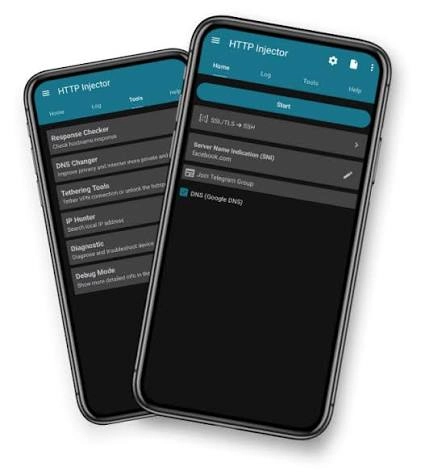
HTTP Injector combines advanced networking capabilities with a clean and practical Android interface. As a result, users can access powerful connection tools without navigating through an overly complicated layout.
Organized Dashboard
First, the application places most essential settings on the main dashboard. Therefore, users can quickly locate important options and configure their connections with fewer steps.
Import and Export Support
Additionally, HTTP Injector allows users to import and export configuration files. Consequently, backing up settings or sharing configurations between devices becomes much more convenient.
Real-Time Connection Status
Moreover, the application displays live connection information throughout the connection process. This feature enables users to verify whether a tunnel has been established successfully while monitoring the current connection status.
Lightweight Installation
Furthermore, compared with many networking applications, HTTP Injector generally requires relatively little storage space. Because of its compact size, it can run efficiently on many compatible Android devices.
Regular Updates
Finally, Evozi periodically releases updates that improve compatibility, enhance stability, fix known issues, and support newer Android versions. As a result, users can benefit from ongoing performance improvements and better overall reliability.
Common Connection Errors in HTTP Injector Evozi
Although HTTP Injector is designed to provide stable connections, users may occasionally encounter networking errors. Fortunately, understanding these messages can help identify the cause more quickly.
HTTP 302 Error
Generally, an HTTP 302 response indicates that the network redirects the connection request to another page. For example, this may happen when an ISP requires authentication through a captive portal or redirects users to a login page before granting internet access.
HTTP 400 Error
Similarly, an HTTP 400 error usually appears when the remote proxy cannot understand the submitted request. In most cases, an incorrectly formatted payload, invalid syntax, or an unsupported request method causes this problem.
Connection Timeout
Sometimes, the application may fail to establish a connection within the expected time. This issue can occur for several reasons, including:
- Slow or unstable internet connection
- Unavailable or offline SSH server
- Unresponsive proxy server
- Firewall or network restrictions
- High server latency or network congestion
Therefore, checking the server status, internet connection, and payload configuration can often help resolve timeout-related issues.
Authentication Failed
Verify that the SSH username, password, server address, and port are correct.
Tips for Better Performance
For improved stability:
- Use reliable SSH servers.
- Import configuration files from trusted sources.
- Keep the application updated.
- Check server latency before connecting.
- Use stable DNS servers.
- Disable Debug Mode after troubleshooting.
- Avoid running multiple VPN applications simultaneously.
Device Compatibility
HTTP Injector generally supports:
- Android smartphones
- Android tablets
- IPv4 and IPv6 networks
- Wi-Fi connections
- Mobile data connections
Compatibility may differ based on Android version and network configuration.
Privacy Considerations
While HTTP Injector encrypts supported network traffic, overall privacy also depends on the SSH server, proxy server, and DNS provider you choose. Users should carefully review server providers before transmitting sensitive information.
Final Thoughts On HTTP Injector Evozi
HTTP Injector Evozi remains one of the most feature-rich Android tunneling applications available for users who want greater control over network routing, SSH connections, proxy configuration, and encrypted communication. Its extensive customization options, combined with support for VPN services, payload generation, proxy management, and detailed connection logs, make it suitable for both experienced users and those learning advanced Android networking. However, users should always configure the application responsibly, use trusted servers, and understand that connection quality depends on the selected network infrastructure rather than the application alone.
Frequently Asked Questions About HTTP Injector Evozi
Is HTTP Injector a VPN?
HTTP Injector is more than a standard VPN app. It can use Android’s VPN service to route device traffic, but it also supports SSH tunneling, custom payloads, proxy servers, DNS settings, and other connection methods.
Does HTTP Injector require root access?
No, most users can run HTTP Injector through VPN Service Mode without rooting their Android device. Root access is only required for specific iptables-based connection modes.
Is HTTP Injector safe to use?
The app can provide encrypted tunneling through SSH or supported SSL/TLS configurations. However, safety also depends on the server, proxy, DNS provider, and configuration file being used. Users should avoid unknown servers and untrusted configuration files.
Who developed HTTP Injector?
HTTP Injector is developed by Evozi, a software developer known for Android networking and utility tools.